KORUS
KORUS helps you run several Claude Code sessions on one project without losing track of their work. It combines scripts that block common mistakes with a way to divide tasks, review changes, and merge them.
The name stands for Keep One Repo, Unblock Sessions. The method comes from one developer’s experience using Claude Code to build a real project.
It covers model settings, account costs, project records, and work across sessions. The korus
repository supplies the scripts for that last part.
Start with Quickstart to install the controls and try an edit they should block. If you’re deciding whether you need them, read the FAQ.
KORUS assumes Claude Code for Desktop. It is aimed at people who use Claude Code throughout a build; an occasional session may not need this setup.
Separate sessions can still undo each other’s work
Suppose session A is editing a file. Before it commits, session B runs this command in their shared checkout:
git checkout -B feature/parser origin/main
Git may allow the switch if the branch is not checked out elsewhere. Both sessions now see files from the new branch, and A’s uncommitted work is on a different branch than A expects.
Neither session gets a warning that the other one changed its workspace.
Other conflicts are harder to spot. Sessions can edit the same file, reuse a record number, compete for a config lock, or change shared lists and agent memory.
They can also build the same feature in different files. Both pull requests pass their checks, Git reports no conflict, and someone later has to discard one implementation.
The upstream report, claude-code#76590, includes a field report of roughly fourteen sessions sharing one directory.
Claude Code’s native worktrees now prevent many writes back into the main checkout. A worktree is a separate checkout with its own branch and files, but shared Git history.
Those checks do not coordinate edits between isolated sessions. PowerShell also has fewer command checks than Bash. The FAQ explains where KORUS adds protection.
A blocked edit gives you time to coordinate
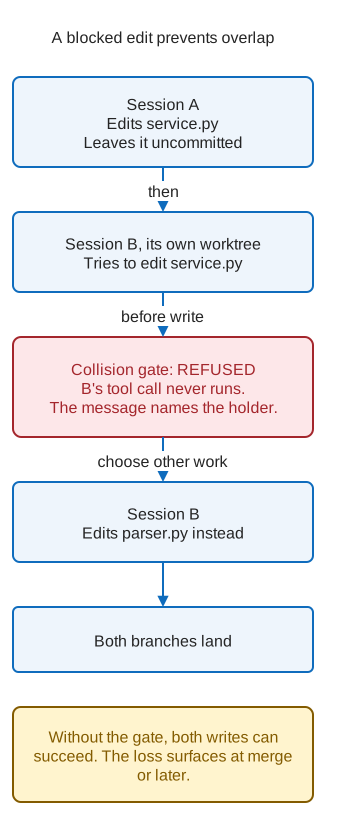
Session A edits service.py and leaves the change uncommitted. Session B tries to edit the same file
in its own worktree.
The collision gate blocks B’s edit before it runs. Its message names the live session holding the change and, when available, the task that session is doing.
B can coordinate with A or work on parser.py instead. That gives both sessions a chance to finish
without finding the overlap at merge time.
The scripts check edits, commits, and pushes
| Control | What it does | Where it stops |
|---|---|---|
| Worktree gate | Blocks edit-tool writes into an allowlisted primary checkout and selected Git commands that swap its tree | It does not see every way a shell command can write a file |
| Collision gate | Blocks an edit when a live peer has uncommitted changes to that file | It cannot block work it cannot see; two sessions can still build the same feature in different files |
| Git hooks | Reject a commit claiming work the worktree does not hold, and a direct push to a protected branch | --no-verify skips them without a local record; use remote branch protection too |
| Sequence allocation | Uses an atomic file create to give each caller a different record number | Both sessions must ask; no installer wires the commit-time sequence gate |
| Pruning | Removes a worktree only when it is merged, clean, and unoccupied | Some occupants are invisible, including one editing by absolute path from elsewhere |
The sequence gate ships unwired. The doctor reports it OFF until you wire it.
The pruning tool stops when it knows it cannot determine occupancy. Each run also lists four cases it cannot detect. Check those limits before removing worktrees.
The worktree guide compares the three controls related to the branch-switch example. Only the worktree gate prevents that failure.
People still need to divide the work
Scripts do not assign jobs. You give each session a role in its opening prompt: one briefs and checks progress, one builds a task, one reviews it, and one decides what merges.
Another role investigates failed checks. Run a KORUS build explains the arrangement.
More sessions can produce work faster than the project can review and merge it. The reported run in the FAQ shows that limit; it does not establish a productivity gain.
| Decision | Guide |
|---|---|
| Which model and effort setting to use | The KORUS framework, the original account rewritten with permission |
| How to run one desktop instance per Claude account | Desktop accounts |
| How account cost compares with published API rates | Token accounting |
| What to keep in the backlog, decision records, and security register | The KORUS framework |
| When to stop before a usage limit | Usage awareness, a design with no shipped hook |
| Which checks establish that work is done | CI for leaders |
Install the controls, then check that they work
Setup copies scripts/, bin/, and ccx.config.json into your repository. You commit those files
and edit two config keys. Cloning this repository alone installs nothing.
An allowlist under your user config root applies per machine. Other controls have different scopes; Install lists them and explains how to check each one.
These controls prevent accidents; they are not a security boundary. A shell command can write a file without the edit-time gates seeing its target.
Run the doctor before and after installation. An edit succeeding cannot tell you whether a gate is working or simply absent.
pwsh -NoProfile -File <tooling>/bin/ccx-doctor.ps1 -Repo <the-repo-you-govern>
There is no ccx command on PATH. Use Troubleshooting for red or undetermined
rows, and Limits and requirements for platform support and blind spots.
Choose your next step
| You want to | Read |
|---|---|
| Try the tooling | Quickstart |
| Understand the shared-repository model | Concepts |
| Have Claude Code assess your project | Feed this to Claude Code |
| Set up session communication and merging | Running multiple sessions |
| Find a command | Every script |
| Set up a working agreement | CLAUDE.md.template |
For day-to-day work, the guides follow this order: Worktrees, Coordination, Steering, Sequence allocation, PRs and merges, then Pruning.
Leak gate describes a scanner you can run and its blind spot. Session mail explains how to build communication for peers that announce cannot reach.
Tips and tricks collects lessons from use. The case studies cover a drift audit, a correction chain, and a claim three verifiers refuted.
The standards live at secure-development-standards.